

Important
Self-hosted LangSmith is an add-on to the Enterprise plan designed for our largest, most security-conscious customers. For more details, refer to Pricing. Contact our sales team if you want to get a license key to trial LangSmith in your environment.
Self-hosted LangSmith is an add-on to the Enterprise plan designed for our largest, most security-conscious customers. For more details, refer to Pricing. Contact our sales team if you want to get a license key to trial LangSmith in your environment.
LangSmith Observability and Evaluation
Host an instance of LangSmith that includes observability, tracing, and evaluations in the UI and API. Best for teams who want self-hosted monitoring and evaluation without deploying agents.
LangSmith Observability, Evaluation, and Deployment
Enables deploying graphs to Agent Server via the control plane. The control plane and data plane provide the full LangSmith platform for running and monitoring agents. This includes observability, evaluation, and deployment.
Standalone server
Host an Agent Server directly without the control plane UI. A lightweight option for running one or a few agents as independent services, with full control over scaling and integration.
For setup guides, refer to:Supported compute platforms: Kubernetes (for LangSmith Deployment), any compute platform (for Standalone Server)Before installing or upgrading, review the minimum versions for self-hosting dependencies.
Self-host LangSmith observability and evaluation
Host an instance of LangSmith that includes observability, tracing, and evaluations in the UI and API, but without the ability to deploy agents through the control plane. This includes: Services:- LangSmith frontend UI
- LangSmith backend API
- LangSmith Platform backend
- LangSmith Playground
- LangSmith queue
- LangSmith ACE (Arbitrary Code Execution) backend
- ClickHouse (traces and feedback data)
- PostgreSQL (operational data)
- Redis (queuing and caching)
- Blob storage (optional, but recommended for production)
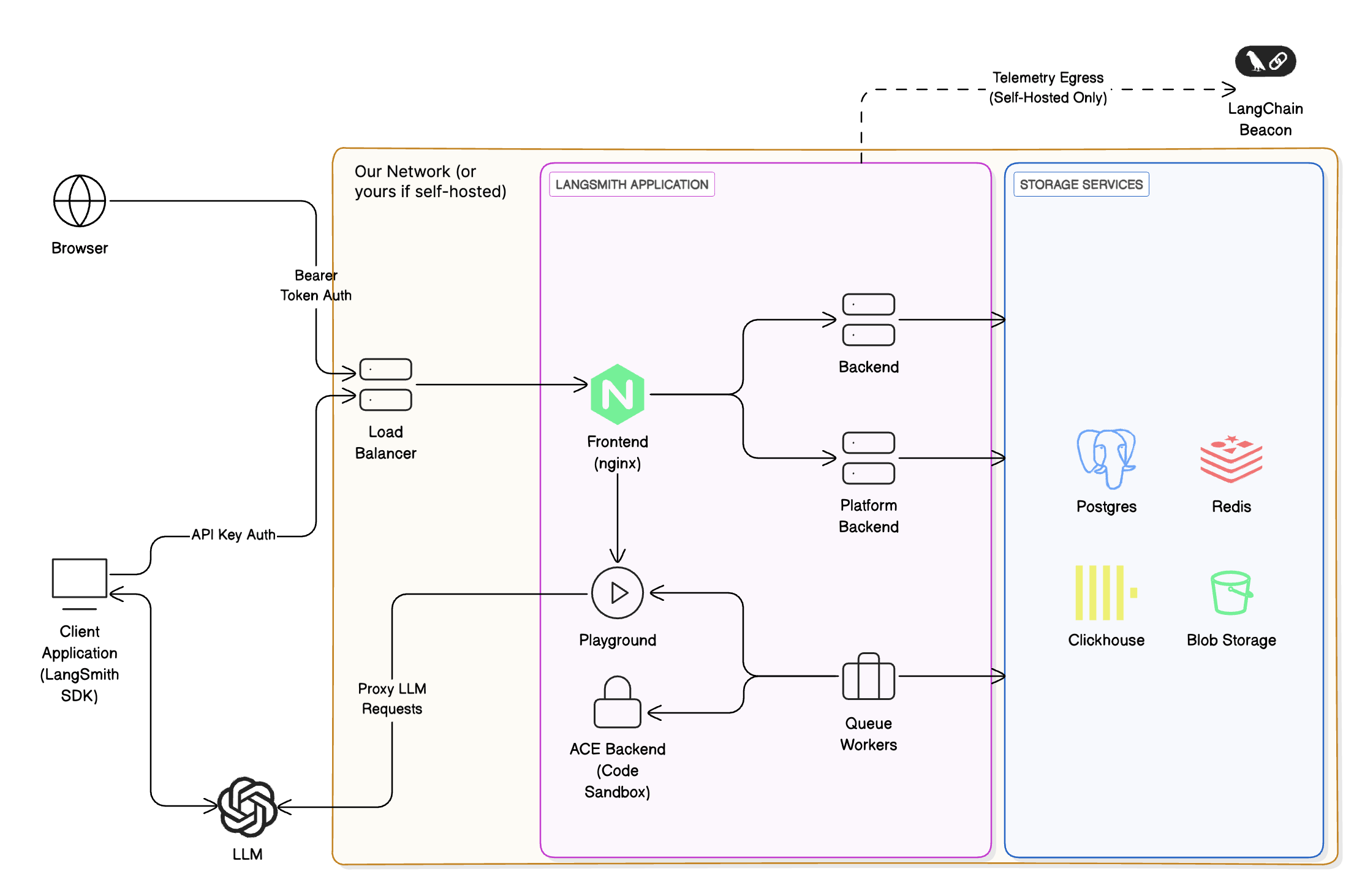
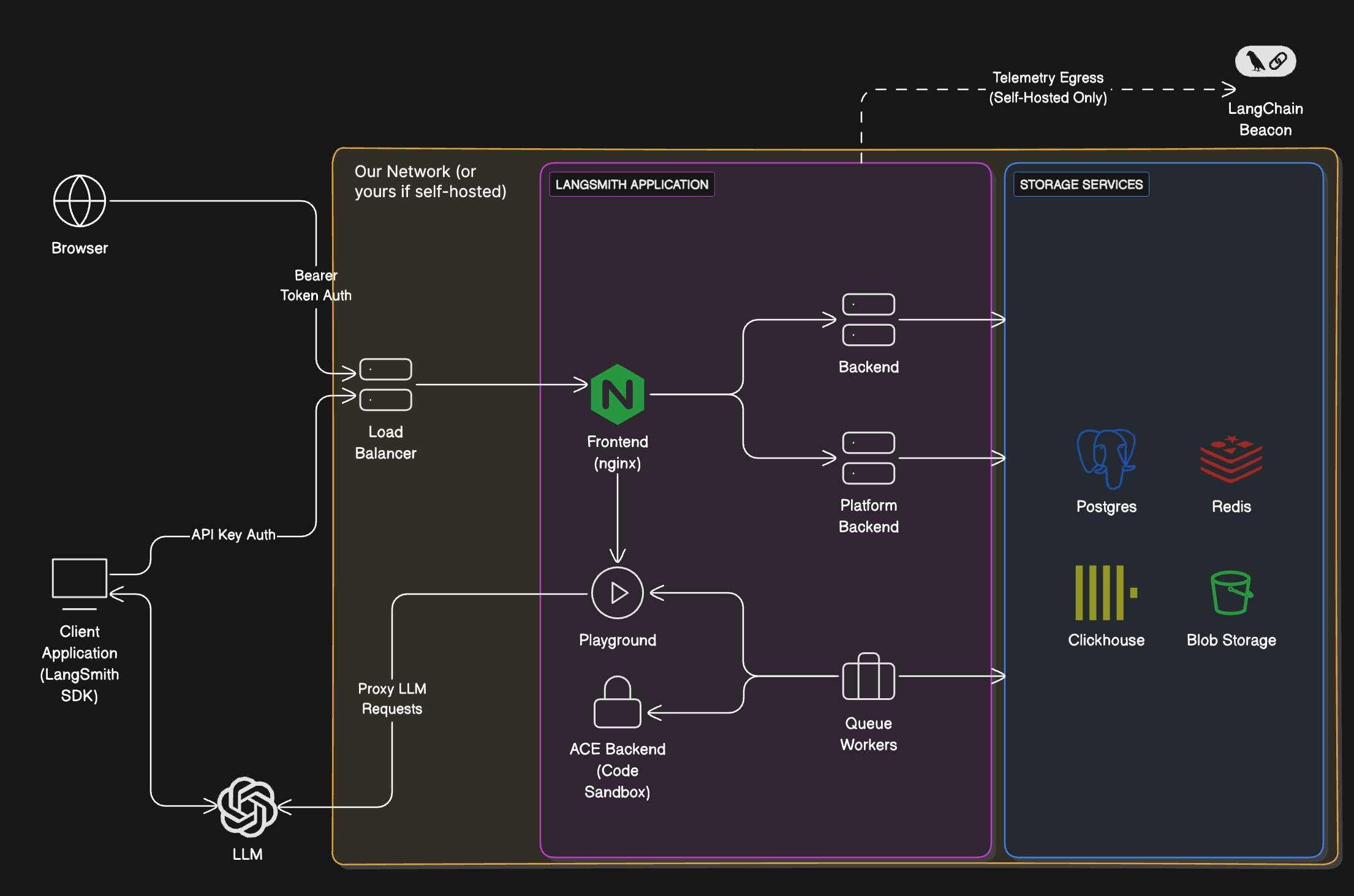
Services
Storage services
LangSmith will bundle all storage services by default. You can configure it to use external versions of all storage services. In a production setting, we strongly recommend using external storage services.
To install, follow the Kubernetes setup guide.
Enable LangSmith Deployment
LangSmith Deployment is an optional add-on that can be enabled on your LangSmith instance. It’s ideal for enterprise teams who want a centralized, UI-driven platform to deploy and manage multiple agents and graphs, with all infrastructure, data, and orchestration fully under their control. This includes everything from LangSmith, plus:
You run both the control plane and the data plane entirely within your own infrastructure. You are responsible for provisioning and managing all components.
Learn more about the control plane and data plane architecture concepts.
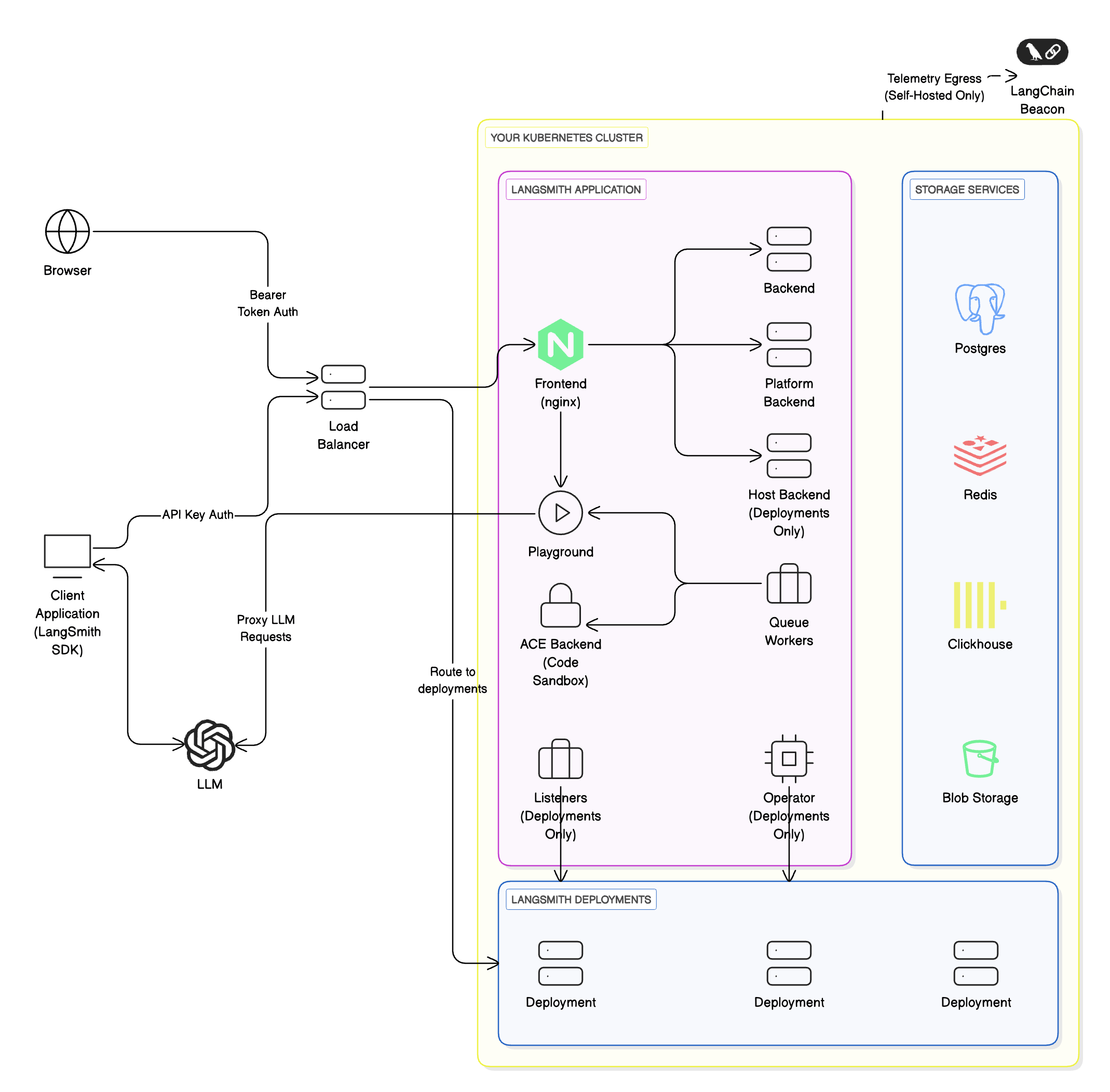
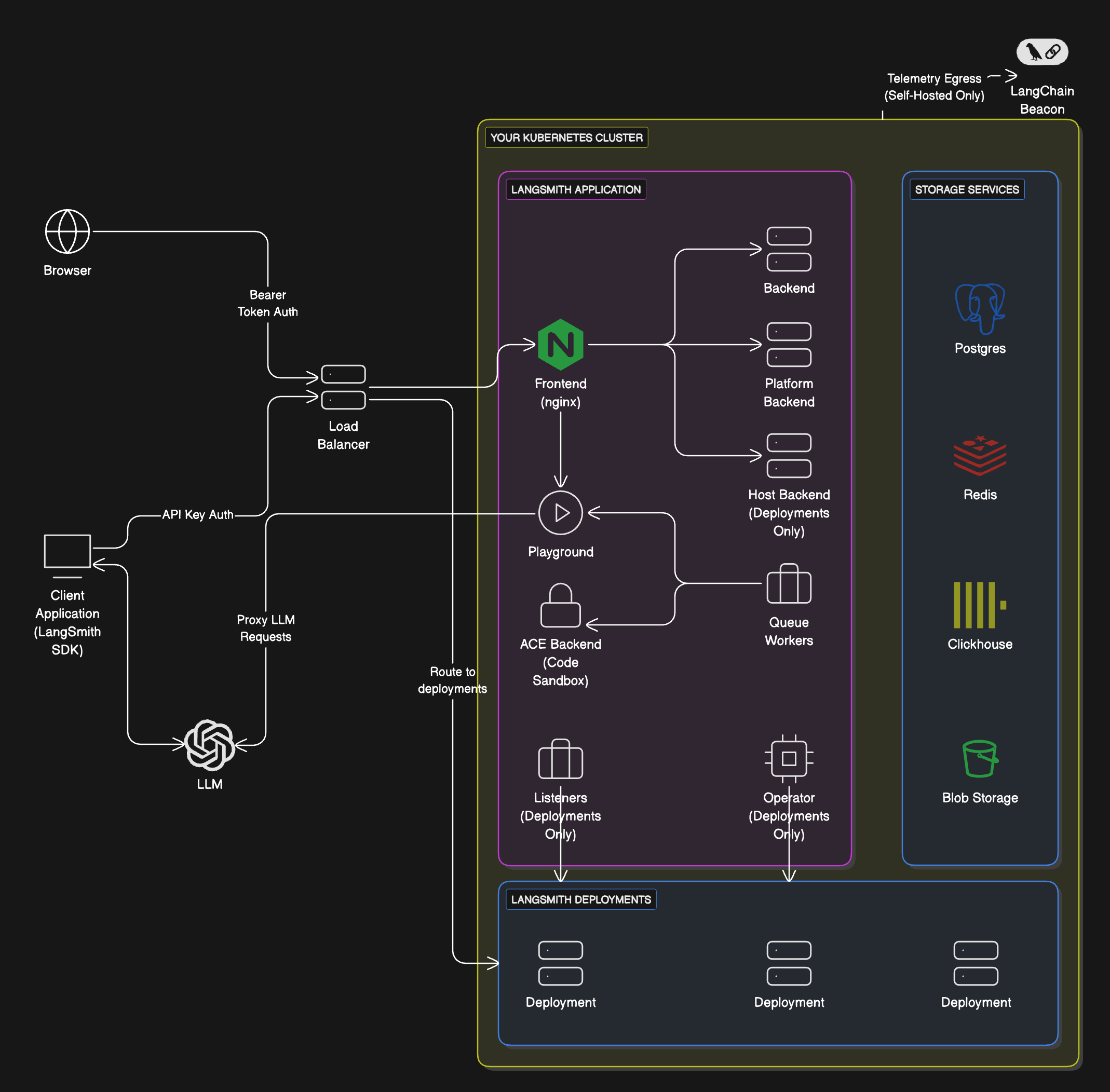
Workflow
If you want to self-host LangSmith for observability, evaluation, and agent deployment, follow these steps:1
Install self-hosted LangSmith
You must already have a self-hosted LangSmith instance installed in your cloud with a Kubernetes cluster (required for control plane and data plane).
2
Test your graph locally
Use
langgraph-cli or Studio to test your graph locally.3
Enable LangSmith Deployment
Follow the setup guide to enable LangSmith Deployment on your LangSmith instance.
Standalone Server
The Standalone server option is the most lightweight and flexible way to run LangSmith. Unlike the other models, you only manage a simplified made up of Agent Servers and their required backing services (PostgreSQL, Redis, etc.). This includes:
This option gives you full control over scaling, deployment, and CI/CD pipelines, while still allowing optional integration with LangSmith for tracing and evaluation.
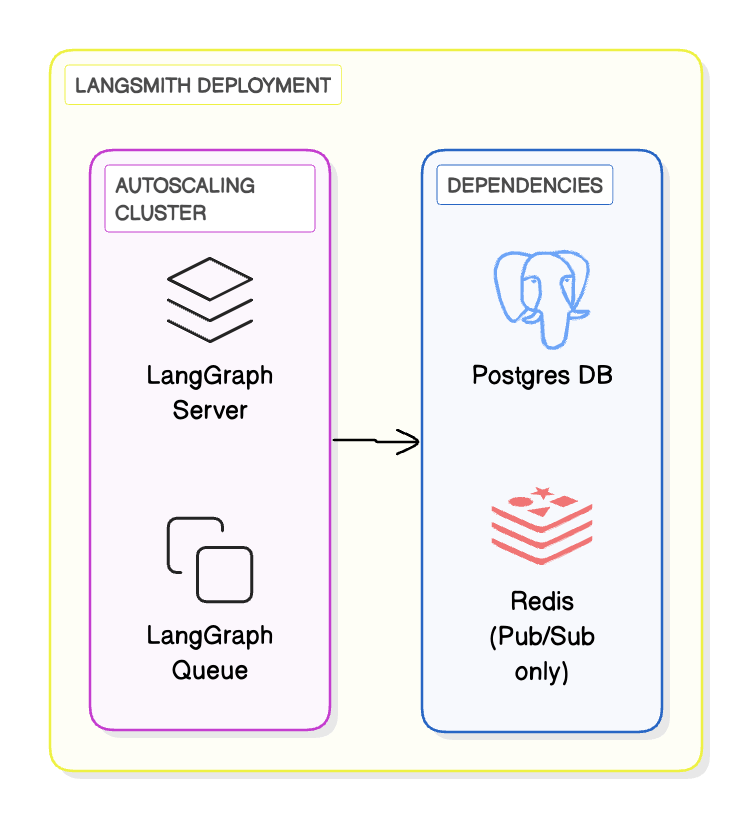
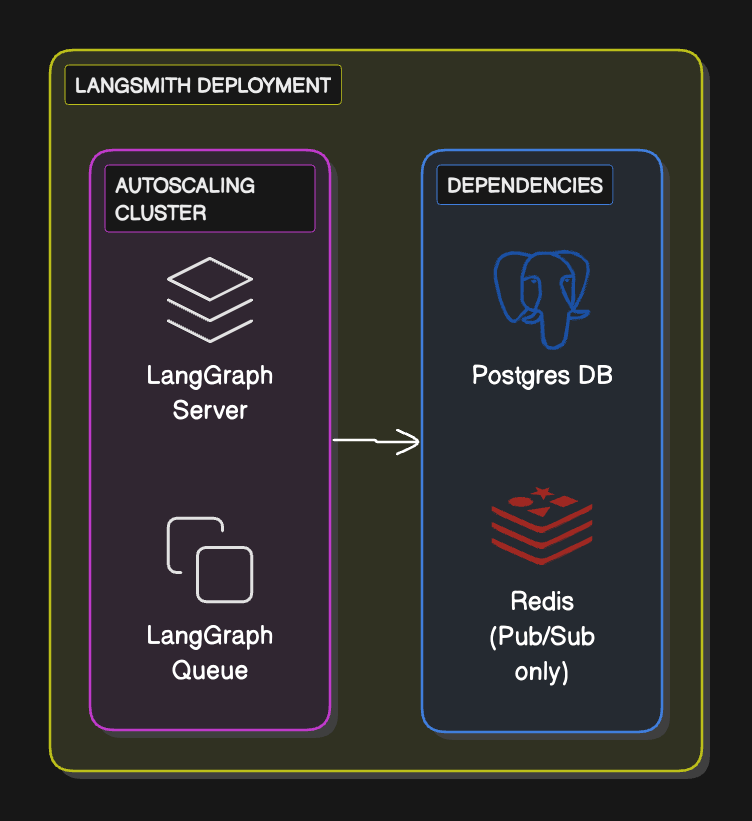
Workflow
- Define and test your graph locally using the
langgraph-clior Studio - Package your agent as a Docker image
- Deploy the Agent Server to your compute platform of choice (Kubernetes, Docker, VM)
- Optionally, configure LangSmith API keys and endpoints so the server reports traces and evaluations back to LangSmith (self-hosted or SaaS)
Supported compute platforms
- Kubernetes: Use the LangSmith Helm chart to run Agent Servers in a Kubernetes cluster. This is the recommended option for production-grade deployments.
- Docker: Run in any Docker-supported compute platform (local dev machine, VM, ECS, etc.). This is best suited for development or small-scale workloads.
Setup guide
Connect these docs to Claude, VSCode, and more via MCP for real-time answers.